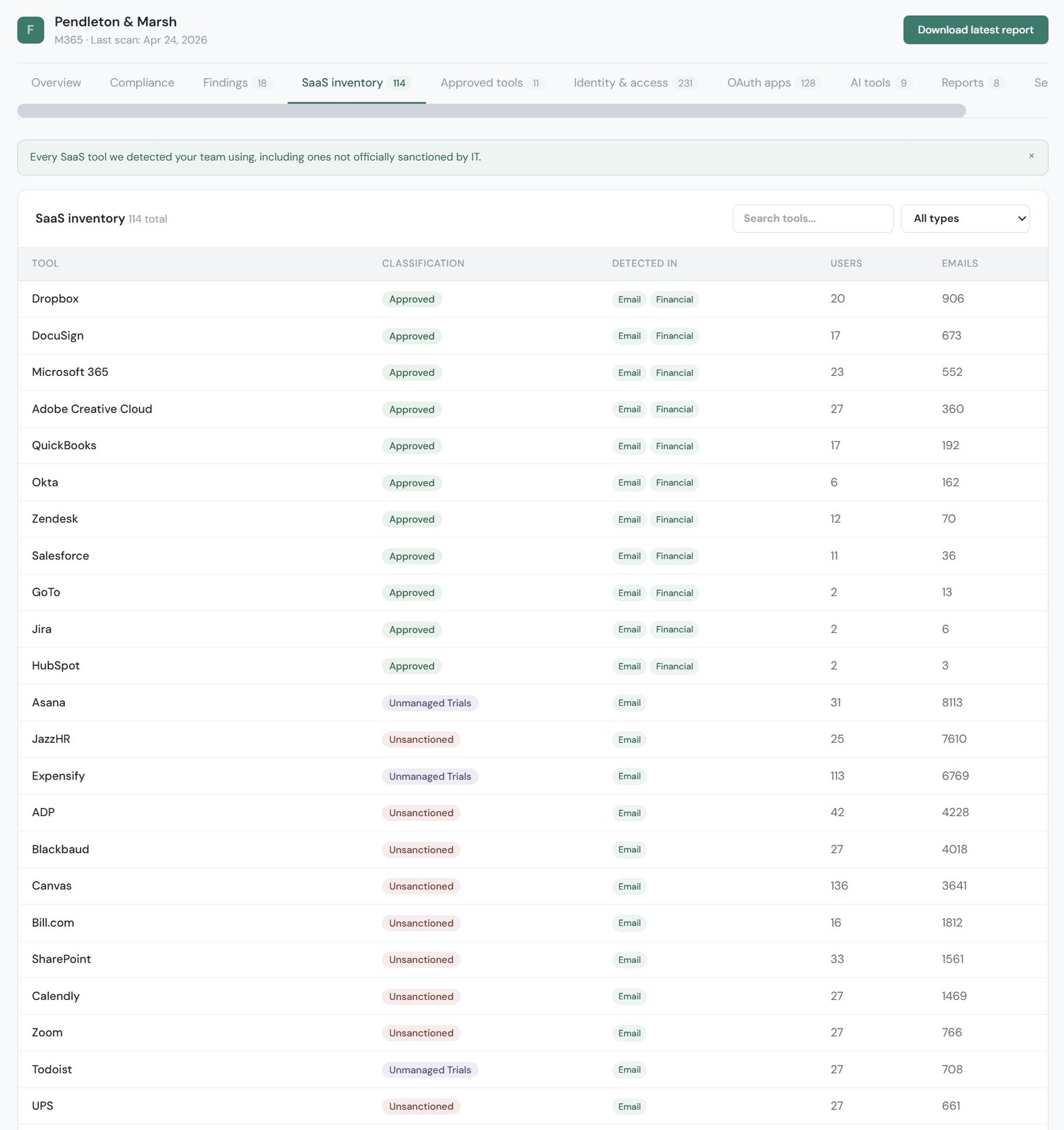
FailSafe reads your Microsoft 365 or Google Workspace tenant and builds the list: every app, who uses it, how it got in, and what it can reach. For the team with an auditor on the calendar, the IT manager who inherited the spreadsheet, and the MSP who is tired of asking the client.
SaaS apps in use at the average company under 500 employees.
Of SaaS spend now sits with lines of business, not IT.
Of employees will acquire, modify, or create technology outside IT's visibility by 2027, up from 41% in 2022.
Of organizations breached through SaaS believed they had appropriate visibility at the time.
The directory shows what is connected. Finance shows what is paid. Inboxes hold the sign ups nobody mentioned. Each one is right, and none of them is the list.
The auditor wants a system inventory with owners. The spreadsheet from the last fundraise is stale, and the person who built it has moved on. FailSafe builds the list from the tenant itself, maps it to the frameworks, and gives you a PDF to hand over.
You know the apps you set up. You do not know the ones a department head signed up for last quarter, or the free tier with customer data in it. FailSafe cross references the directory, mailboxes, and the books, and keeps the result in one place.
Onboarding starts with a questionnaire the client never finishes. Connect the tenant read only and FailSafe produces the inventory without the back and forth, with a report ready for the first business review.
Not a list of names. Each app comes with the context you need to decide what to do about it.
| Field | What it tells you |
|---|---|
| App and vendor | The product by name, with its vendor and category, matched against a catalog of thousands of SaaS vendors. |
| Users | Who has it, by account, so you can find the owner and the stragglers. |
| How it got in | The layer that found it: directory, email, finance, or endpoint. One source is a gap worth a look. All of them means approved and tracked. |
| What it can reach | OAuth scopes and admin consent on every connected app, so you can see which ones can read mail, files, or the directory. |
| Status | Sanctioned or unsanctioned, with an approve workflow so the list becomes a decision record instead of a snapshot. |
| Vendor security | SOC 2 and ISO status, breach history, and SSO and MFA support, from public records. |
| Cost | What you pay for it, when the finance layer is connected (Discover plus Spend). |
Read only connections to platforms you already run. Transparent and revocable.
Read only access to the admin directory. Every connected app, user, admin role, and license.
Adoption signals from mailbox indicators: the sign ups and receipts that never touched the directory. Never personal correspondence.
An accounting or transaction export, matched against the discovered tools. Catches what is paid for but not connected.
Installed app inventories from your endpoint tools. Catches what cloud APIs can not see.
No single source gives the full list. The value is in connecting the signals. An app in the directory with no payment and no email is usually a free tier with company data inside. A payment with no directory entry is a subscription IT does not know about.
Every major framework starts with the same question: what do you run? FailSafe maps its findings to these in the report.
| Framework | Control | What it asks for |
|---|---|---|
| SOC 2 | CC6.1 | Identify and manage the inventory of information assets, as a point of focus under logical access. |
| ISO 27001:2022 | Annex A 5.9 | An inventory of information and other associated assets, with owners. |
| CIS Controls v8 | Control 2, Safeguard 2.1 | Establish and maintain a detailed software inventory: title, publisher, install date, and business purpose. |
| NIST CSF 2.0 | ID.AM-02 | Inventories of software, services, and systems managed by the organization are maintained. |
What your auditor accepts is their call. A current list, with who uses each app, is what they usually ask for first, and that is what the scan produces. The report ships with the crosswalk to NIST CSF 2.0, CIS v8, SOC 2, and ISO 27001:2022.
The free scan runs the real pipeline on your tenant and shows you the shape of the result. Paid plans show you every row.
No. Connect, scan, and read the preview with no card, for tenants up to 80 users. Upgrade later and the full report regenerates from the same scan, no rescan needed.
Read only. Microsoft 365 connects through an admin consented app registration and Google Workspace through domain wide delegation to a service account. Both are revocable from your admin console at any time, and FailSafe never writes to your tenant.
FailSafe gives you the inventory and a report mapped to SOC 2, ISO 27001:2022, CIS v8, and NIST CSF 2.0. Whether a given artifact is sufficient evidence is your auditor's call. Most ask for a current list with who uses each app, and that is what the scan produces.
Often, yes. The email layer reads sign up and receipt signals from mailboxes, never personal correspondence, so a tool adopted on a personal card shows up as an unsanctioned entry even though it never touched the directory or the company's books.
Connect Microsoft 365 or Google Workspace, read only and revocable. The free scan shows you the shape of the inventory today.
Sources for the figures above. 152 apps and 70% of spend: Zylo, 2025 SaaS Management Index, January 2025. 75% of employees by 2027: Gartner press release, March 28, 2023. 89% of breached organizations: AppOmni, The 2025 State of SaaS Security Report, July 2025. All figures are the publishers' own. If anything here is out of date, email info@optiflowlabs.ai and we will correct it.