SaaS security posture inside your RMM.

FailSafe pushes posture grade, OAuth audit, AI tool inventory, and license usage into NinjaOne organization custom fields after every scan. Your team sees live SaaS risk without leaving NinjaOne.

The pipeline

From tenant to RMM in one flow.

FailSafe scans your Microsoft 365 and Google Workspace tenants, scores the posture, and pushes the result straight into NinjaOne.

SOURCES Microsoft 365 Google Workspace Users, OAuth apps, audit logs, license assignments SCAN ENGINE FailSafe Discover, score, surface findings, render report RMM NinjaOne 11 custom fields per organization, branded tab, deep link to full report
Live integration

Two screens. One source of truth.

Connect a FailSafe engagement to a NinjaOne organization in under 30 seconds. Posture data flows automatically after every scan.
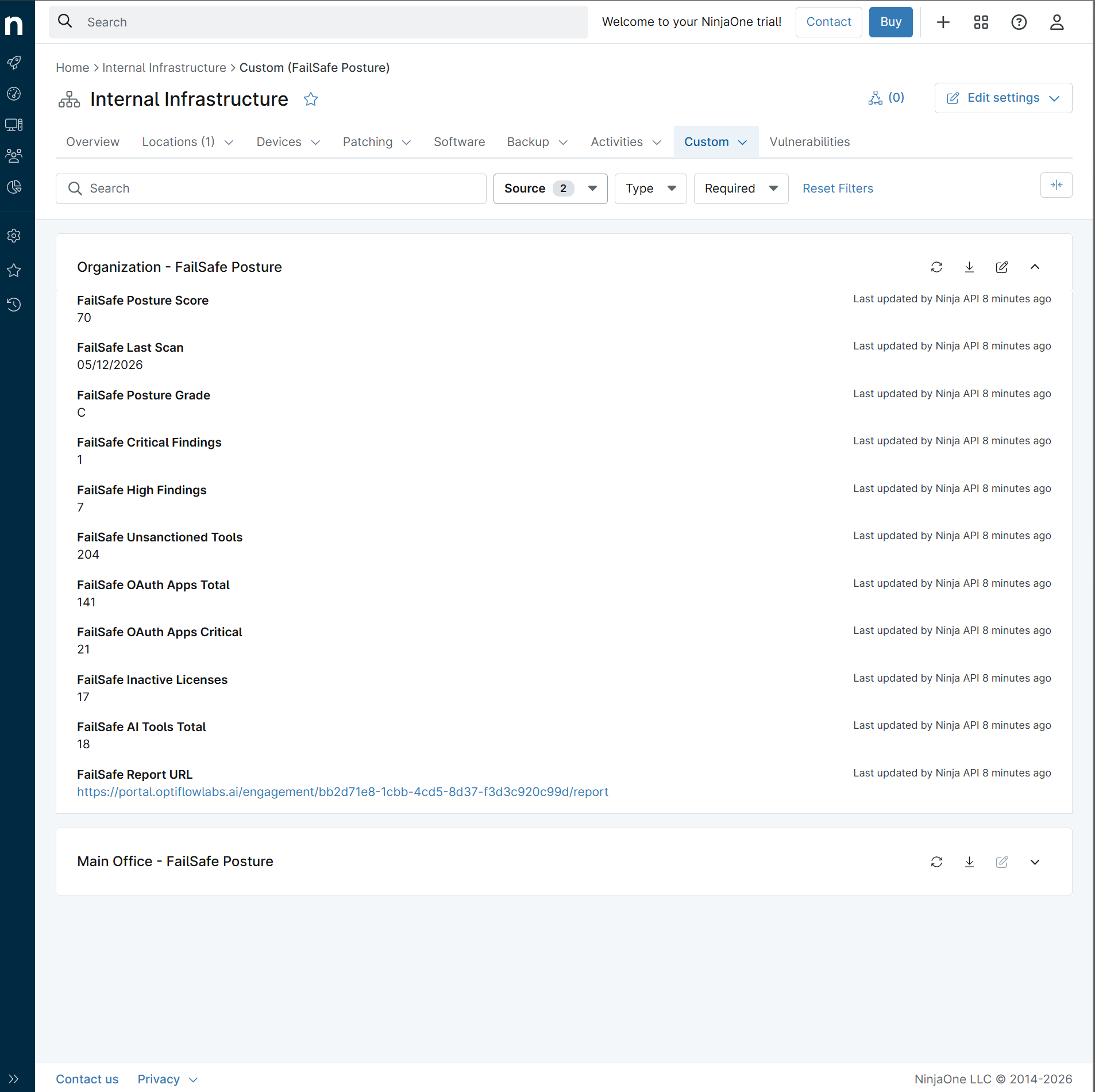
NinjaOne organization Custom tab showing FailSafe Posture fields populated with posture score, finding counts, OAuth risk, and report URL
NinjaOne side

FailSafe Posture in NinjaOne

11 custom fields populated per organization, grouped under a branded FailSafe Posture tab. Posture grade, finding counts, OAuth risk, AI tool inventory, license waste. One click deep link back to the full audit report.
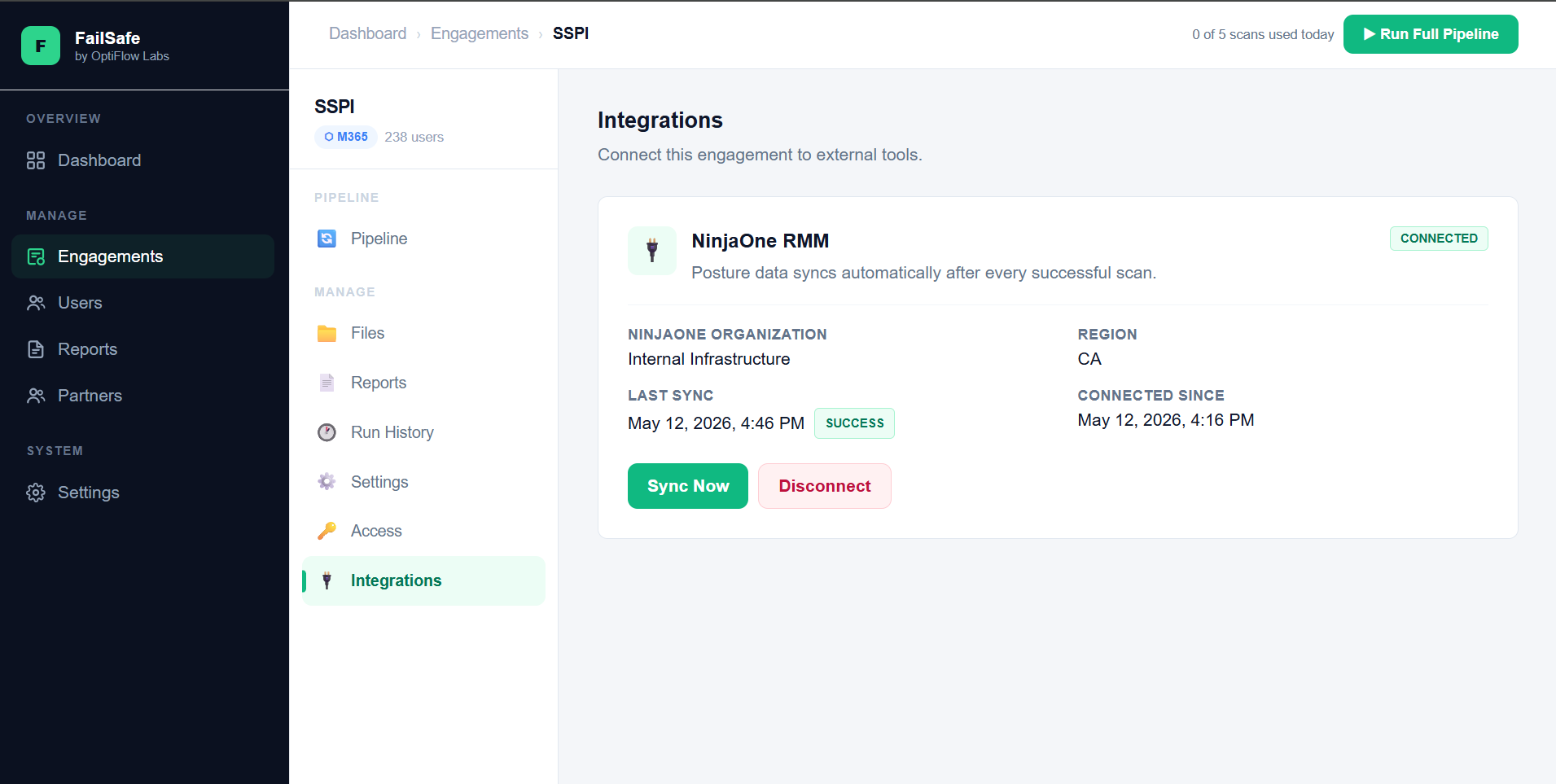
FailSafe portal Integrations tab showing connected NinjaOne integration with successful sync status
FailSafe side

Configure in the FailSafe portal

Region picker, paste credentials, select the target NinjaOne organization, done. Connection status, last sync time, and manual sync trigger all on a single panel. Disconnect at any time.

Portfolio view

Your organizations at a glance.

The bird's eye view FailSafe data makes possible across every NinjaOne organization you manage. Refresh on every scan, score every tenant, spot drift before it bites.

Data model

11 custom fields. Every successful scan.

A complete SaaS posture snapshot for each NinjaOne organization. Sparse updates only push fields that have changed.

FailSafePostureGrade
Posture Grade
Letter grade A through F summarizing overall SaaS security posture.
Text
FailSafePostureScore
Posture Score
Numeric score 0 to 100 underlying the letter grade.
Integer
FailSafeLastScan
Last Scan
When FailSafe last produced this posture snapshot.
Date
FailSafeCriticalFindings
Critical Findings
Open findings requiring action within 48 hours.
Integer
FailSafeHighFindings
High Findings
High severity findings to address within 1 to 2 weeks.
Integer
FailSafeOauthAppsTotal
OAuth Apps Total
All third party OAuth applications with access to tenant data.
Integer
FailSafeOauthAppsCritical
Critical OAuth Apps
OAuth apps holding broad or unusual data scopes.
Integer
FailSafeUnsanctionedTools
Unsanctioned Tools
SaaS tools active in the tenant without explicit IT approval.
Integer
FailSafeAiToolsTotal
AI Tools Total
All AI applications detected with user activity in the tenant.
Integer
FailSafeInactiveLicenses
Inactive Licenses
Paid license assignments unused for 90 plus days. System SKUs filtered.
Integer
FailSafeReportUrl
Report URL
Deep link straight to the full FailSafe audit report for this engagement.
URL
Integration architecture

Built on NinjaOne Public API v2.

Standard OAuth 2.0 client credentials flow. No agents, no webhooks to configure on your side. Three steps from zero to live data.

1

Create a NinjaOne API client

Administration to Apps to API. Add a machine to machine client with Monitoring and Management scopes. Takes 30 seconds.

2

Connect inside FailSafe

Open the engagement, click Integrations, paste the Client ID and Secret, pick the target NinjaOne organization from the dropdown.

3

Posture flows on every scan

Every successful FailSafe scan automatically pushes fresh values into the linked NinjaOne organization. No manual sync needed.

Why teams pick this

SaaS risk where your team already works.

The fastest path to making SaaS risk actionable is meeting your team inside the tools they already live in.

One pane visibility

Posture grade, OAuth risk, AI exposure, license waste, all visible in the organization dashboard your team already uses for endpoint and patching.

Review ready reporting

The FailSafe audit report becomes your periodic review artifact. Whether you brief leadership internally or run quarterly business reviews with clients, posture trends and finding closure tell the story.

Per environment isolation

Each FailSafe engagement maps to one NinjaOne organization. Credentials stored encrypted and isolated per engagement. Works for a single environment or hundreds.

Technical detail

Standards based. Production ready.

Designed to align with NinjaOne Technology Alliances Program technical requirements.

Integration mechanics

  • NinjaOne Public API v2 over HTTPS
  • OAuth 2.0 Client Credentials flow
  • Scopes: monitoring and management only
  • All four NinjaOne regions: app, eu, ca, oc
  • Sparse PATCH updates per organization
  • Token cached in memory, refreshed on expiry

Security and operations

  • Credentials encrypted at rest (Fernet AES 128 with HMAC)
  • Per engagement isolation, one credential set per environment
  • Audit log entry for connect, sync, and disconnect events
  • Failed sync attempts surfaced in FailSafe portal UI
  • Non blocking: NinjaOne downtime never fails a scan
  • Disconnect at any time, no data residue
What's coming next

Built toward partnership.

The current integration is the foundation. These are the next moves on the roadmap, in priority order.

01

Findings to NinjaOne tickets

Auto create NinjaOne tickets from critical and high FailSafe findings, with severity mapping, affected user context, recommended remediation, and a deep link back to the finding. Tickets get worked. Reports get forgotten.

02

Devices and SaaS risk correlation

Cross reference NinjaOne device compliance with FailSafe SaaS user role and access. A user holding M365 Global Admin on a non compliant laptop is a different risk than either signal alone.

03

Documentation sync

Push posture summaries, OAuth audit highlights, and remediation history into NinjaOne Documentation. The audit becomes part of the org record, not a separate PDF in someone's inbox.

04

Client portal posture access

White labeled posture view that MSPs can share with their customers, and that internal IT teams can share with leadership. Read only, scoped per engagement, branded to the channel.

About FailSafe

Built for the teams responsible for SaaS risk.

FailSafe is a SaaS Security Posture Management platform for Microsoft 365 and Google Workspace. We help internal IT teams and managed service providers surface third party app risk, AI exposure, unsanctioned tool usage, and identity weak spots their endpoint stack alone cannot see.